Loop Architecture
An architecture style that makes the agentic loop between systems the first-class unit of design. A loop is triggered on a schedule or event, uses one or more systems, follows its instructions, and writes back to those systems. A Loop Architecture is all of your loops, mapped together.
For example: a loop that keeps the changelog in sync with merged pull requests, or one that translates the docs to German whenever the English pages change.
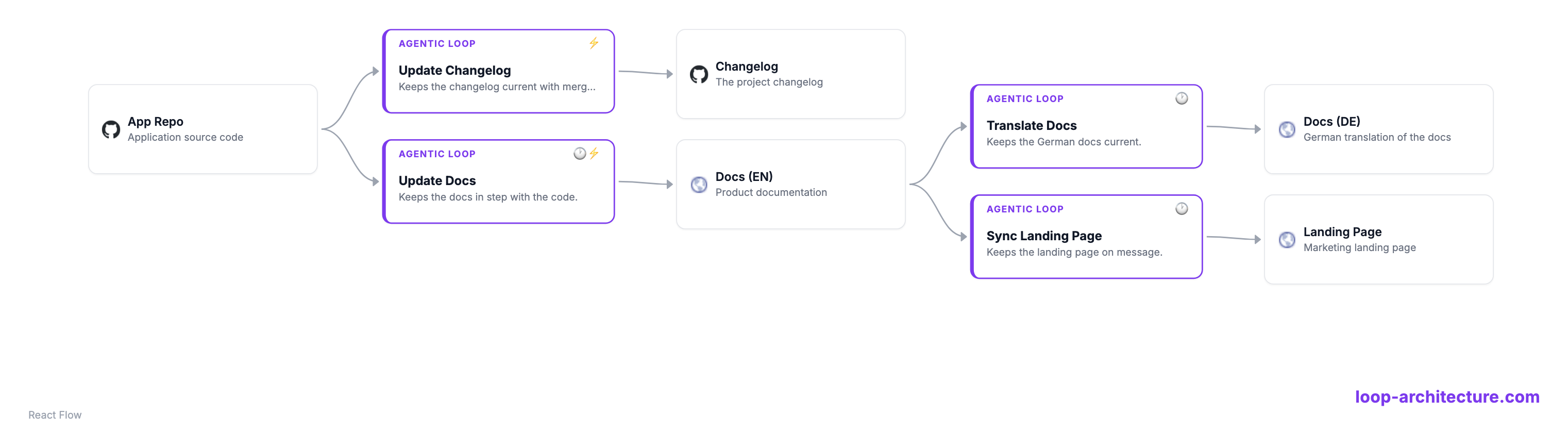
Four principles
-
1
Loop Thinking.
Make the agentic loop between systems your unit of design. Think in loops, not just boxes.
-
2
Continuous and autonomous.
A loop is not a one-off. It keeps turning on its trigger, using systems and writing back on its own, again and again.
-
3
Self-Learning.
Each turn learns from the last. The loop measures its effect and improves how it decides over time.
-
4
Human on the loop.
A human supervises the whole, not every run. They spot-check with samples and focus on the results and their quality, not on reviewing each turn.
Examples
A Loop Architecture is one YAML file. Edit it on the left and the diagram on the right updates live: the systems, the agentic loops, and the edges between them. Pick an example, or click any system or loop for details.
Loading editor…
The format
One plain YAML file with id, systems and loops.
Each loop uses (observe) systems and writes back to (act)
systems. A trigger is a 5-field cron, an ISO timestamp, a GitHub event, or manual.
id: your-org
systems:
  - id: dash0
    url: https://dash0.com            # favicon becomes the icon
    connector: dash0
  - id: code-repo
    repository: https://github.com/your-org/app
  - id: docs
    url: https://docs.your-org.com
loops:
  - id: triage-incidents
    name: Triage Incidents
    trigger: "*/5 * * * *"            # cron | ISO time | github event | manual
    model: claude-opus-4-8          # the model this loop runs on
    observe: [dash0]                # systems it uses
    act: [jira, slack]            # systems it writes back to
    instructions: Detect incidents; open a Jira ticket and post to Slack
  - id: sync-docs
    name: Sync Docs
    trigger:                        # one trigger, or several
      - "0 6 * * *"
      - pull_request.merged
    observe: [code-repo]
    act: [docs]
    instructions: >                     # what the loop does each turn
      Diff the docs against changes merged in the last 24h and open a PR.
tools: [Read, Grep, Bash(gh pr *)]Tooling
Two tools work directly with a Loop Architecture YAML: the loopmanager visualizer to see it, and the loopmanager CLI to validate, visualize and sync it.
loopmanager visualizer
A small, embeddable component (built on React Flow)
that reads a Loop Architecture YAML and maps it to the interactive diagram above itself: the
systems, the agentic loops, and the edges between them. Drop it into any page, or open it from
the CLI with loopmanager view.
Visualizer component → Open the editor →
loopmanager CLI Preview
A Python CLI (built with uv) to validate, visualize and sync loops. It is a preview: the format and commands may still change, and it targets Claude Code routines, itself a research preview.
$ uv tool install loopmanager

$ loopmanager init your-org              # scaffold an architecture
$ loopmanager validate your-org.loopmanager.yaml    # schema + lint
$ loopmanager view your-org.loopmanager.yaml        # open the interactive diagram
$ loopmanager serve your-org.loopmanager.yaml       # run it all locally + live monitoring
$ loopmanager sync your-org.loopmanager.yaml     # → Claude Code routines
$ loopmanager sync ./my-project --from-claude  # ← reverse: routines back to YAML
Routines are cloud-managed. By default sync writes each loop's slash command
(.claude/commands/loop-<id>.md) and prints the /schedule step to
create the routine in your claude.ai account. --local also writes a
.claude/routines/<id>.json descriptor (offline record, read back with
--from-claude).
Getting Started
Two ways in, depending on whether your loops exist yet.
Start fresh, from a Loop Storming
Loop Storming is a collaborative workshop for discovering loops, in the spirit of Event Storming. The team maps the systems, connects them into loops (what each uses and writes back to), names them, writes their instructions, and sets triggers. Encode the wall as one Loop Architecture YAML, then sync it to Claude Code routines.
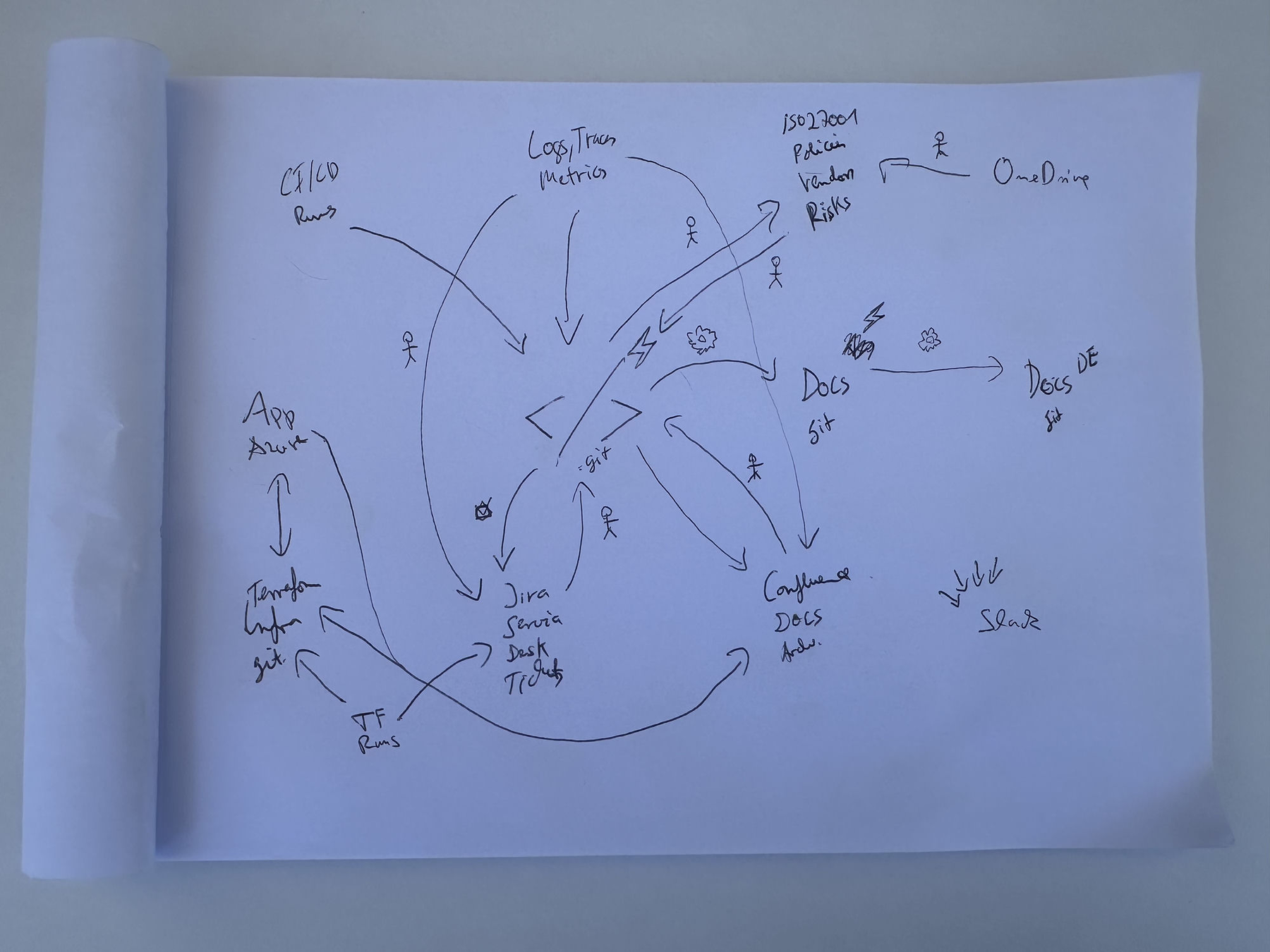
loopmanager
Read the Loop Storming guide →
Or start from what you already run
Already have Claude Code routines? Pull them into one Loop Architecture with
loopmanager sync --from-claude, see the whole picture as a diagram, then refine and
improve the loops from there, and sync back.
loopmanager sync --from-claude
FAQ
- What is Loop Architecture?
- Loop Architecture is an architecture style that makes the agentic loop between systems the first-class unit of design. A loop is triggered on a schedule or event, uses one or more systems, follows its instructions, and writes back to those systems. A Loop Architecture is all of your loops, mapped together in one diagram.
- What is an agentic loop?
- An agentic loop is a continuous cycle where an agent reads from (uses) one or more systems, follows its instructions toward a goal, and writes back to systems, again and again on its trigger. It runs continuously and is self-learning.
- Where is the loop, I don't see a cycle in the diagram?
- Each agentic-loop block is the loop. It is triggered, uses systems, follows its instructions, writes back, and then turns again on its next trigger, evaluating itself each time. The loop lives inside the block, so there is no separate feedback arrow to draw. Loop Architecture is about these continuous, self-paced loops that run on a schedule or event, not goal-based loops that stop at a condition, nor turn-based back-and-forth loops, which are more human-driven.
- What is Loop Storming?
- Loop Storming is a collaborative workshop for discovering the agentic loops between your systems, in the spirit of Event Storming. You map the systems (focusing on data, source code and storage), connect them into loops, name them, and set triggers.
- How do I sync a loop to Claude Code?
- Encode your loops in one Loop Architecture YAML file and run
loopmanager sync. It writes each loop's slash command and prints the/schedulestep to register it as a routine in your claude.ai account, routines are cloud-managed by default. Add--localto also write.claude/routinesdescriptors you can read back. - What is loopmanager?
loopmanageris a Python CLI (built with uv) that validates, visualizes and syncs a Loop Architecture to Claude Code routines, and reads them back with--from-claude.- How is Loop Architecture different from event-driven or microservice architecture?
- Traditional architecture designs the systems and the requests between them. Loop Architecture designs the agentic loops that run continuously between those systems, each using some systems and writing back to others.
- How is this different from a CI/CD pipeline or a GitHub workflow?
- You can absolutely run a single loop as a pipeline or a GitHub workflow, a trigger plus a
script that calls an agent, and
loopmanagercan even sync loops to those runtimes. The difference is the level: a pipeline automates one job with fixed steps, while a Loop Architecture maps all of your loops across all systems in one file, makes the agentic loop (the agent decides how, you don't script each step) the unit of design, and keeps them continuous, autonomous and self-learning with a human on the loop. The pipeline is one runtime; Loop Architecture is the design above it. - Who created Loop Architecture?
- Loop Architecture was coined by Arif Wider and Simon Harrer at SummerSOC on 1 July 2026, on the island of Crete. Read the origin story →